Phishing and smishing
Protect yourself from phishingHere you’ll find resources to protect yourself from social engineering fraud attempts.
Learn about:
Types of social engineering
What to look for in a phishing email
What to look for in a smishing text
Cybersecurity best practices
Phishing protection resources

Types of social engineering

Phishing
Phishing is an email-based type of online fraud designed to steal your personal information such as credentials (account name & password), credit card/bank account information, or other valuable related data. Phishing is typically carried out by e-mail and is disguised to appear as a legitimate request from someone you think you can trust. The sender places links, attachments, and phone numbers in these messages intended to get you to respond; this often results in malware downloading to personal devices, re-directs to phony websites, or direct phone calls with scammers who in turn steal and commit fraud with your identity.

Smishing
Also known as SMS (text), phishing is a type of fraud performed on cellular phones and smart devices that is designed to steal your personal information or compromise your device. Much like phishing, it is also disguised to appear as a legitimate text message from someone you think you can trust. The sender places links, attachments, and phone numbers in these messages intended to get you to respond; this often results in malware downloading to personal devices, re-directs to phony websites or direct phone calls with scammers who in turn steal and commit fraud with your identity.
If you suspect that you received a smishing text, report the number to your phone provider, block the sender, and delete the message.
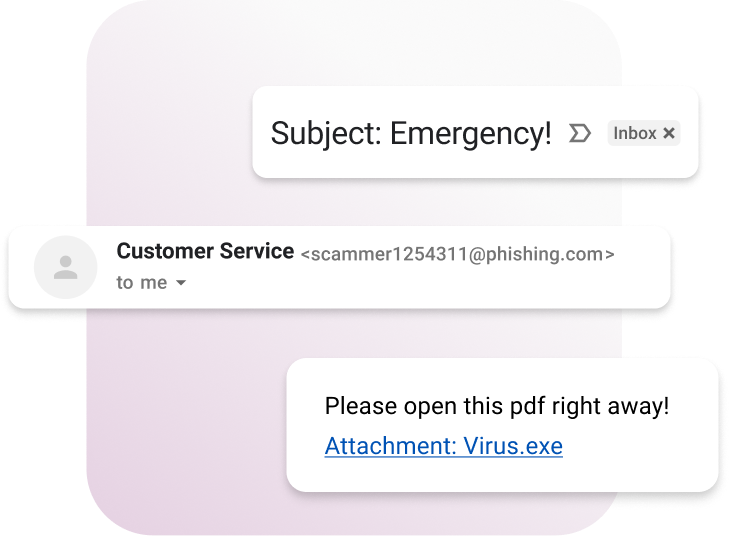
What to look for in a phishing e-mail
Mismatched email domain:
URL link mismatch to supposed sender domain.
Encrypted, compressed, or executable files:
Examples: [.7z, exe., bat, bin, rar, -py]
Note: Some mail browsers may block or warn if these are seen as attachments. If you aren't expecting an email with an attachment, beware.
Sounds urgent, bad spelling/grammar, makes you nervous:
Phishing emails are written to be enticing, eye catching, and will try to get you to act now.
If you didn't expect an email, and something doesn't “smell” right, chances are it's phishing!

What to look for in a Smishing text
If you get a text from an unknown number:
Does the text feel highly unexpected and unusual?
If the person says they know you, how else can you verify them (e.g., email, another phone number you have for them, or through social media)?
Were you expecting a text regarding the subject?
Is the sender asking for personal information or for you to do something “urgent?”
Does the text contain an unusual looking link the sender wants you to click? If any of the above apply, chances are it's smishing.
Cybersecurity best practices
On average, identity theft and personal data breaches occur over 100,000 times a year in the United States, according to the Federal Bureau of Investigation (FBI). Many data breaches result in the compromise of login credentials, credit card/bank account information, and sensitive identification numbers like social security numbers.

Cybersecurity dos
Use credit monitoring services or freeze your credit with the credit bureaus.
Enable Multi-factor Authentication (MFA) on all accounts for financial services.
Monitor banking and credit card accounts daily for unusual purchases.
Monitor email and text message for alerts of successful and failed logons as well as notifications of purchases.
Use unique passwords for important web sites. A password manager is a great way to do this.
Use complex/long passwords more than 12 characters including a mix of uppercase, numbers, and special characters).
Ensure online sessions are secure before entering any financial information (look for the lock or HTTPS in the browser URL).

Cybersecurity don’ts
Use credit monitoring services or freeze your credit with the credit bureaus.
Enable Multi-factor Authentication (MFA) on all accounts for financial services.
Monitor banking and credit card accounts daily for unusual purchases.
Monitor email and text message for alerts of successful and failed logons as well as notifications of purchases.
Use unique passwords for important web sites. A password manager is a great way to do this.
Use complex/long passwords more than 12 characters including a mix of uppercase, numbers, and special characters).
Ensure online sessions are secure before entering any financial information (look for the lock or HTTPS in the browser URL).

Report fraud
Do you think you’ve become a victim of fraud? Let us help you.

If you believe you may be a victim of fraud, please complete our form to report fraud online.

If you suspect fraud on a transaction that has not yet been received, please contact our Customer Care Center at 1-800-933-3278 to have the transaction canceled immediately.

If you used MoneyGram to wire money as a result of a scam, please complete our form to report fraud online.